 Blue Dolphin
 Chapter 6 of 16
Warnings: depth, speed, shore
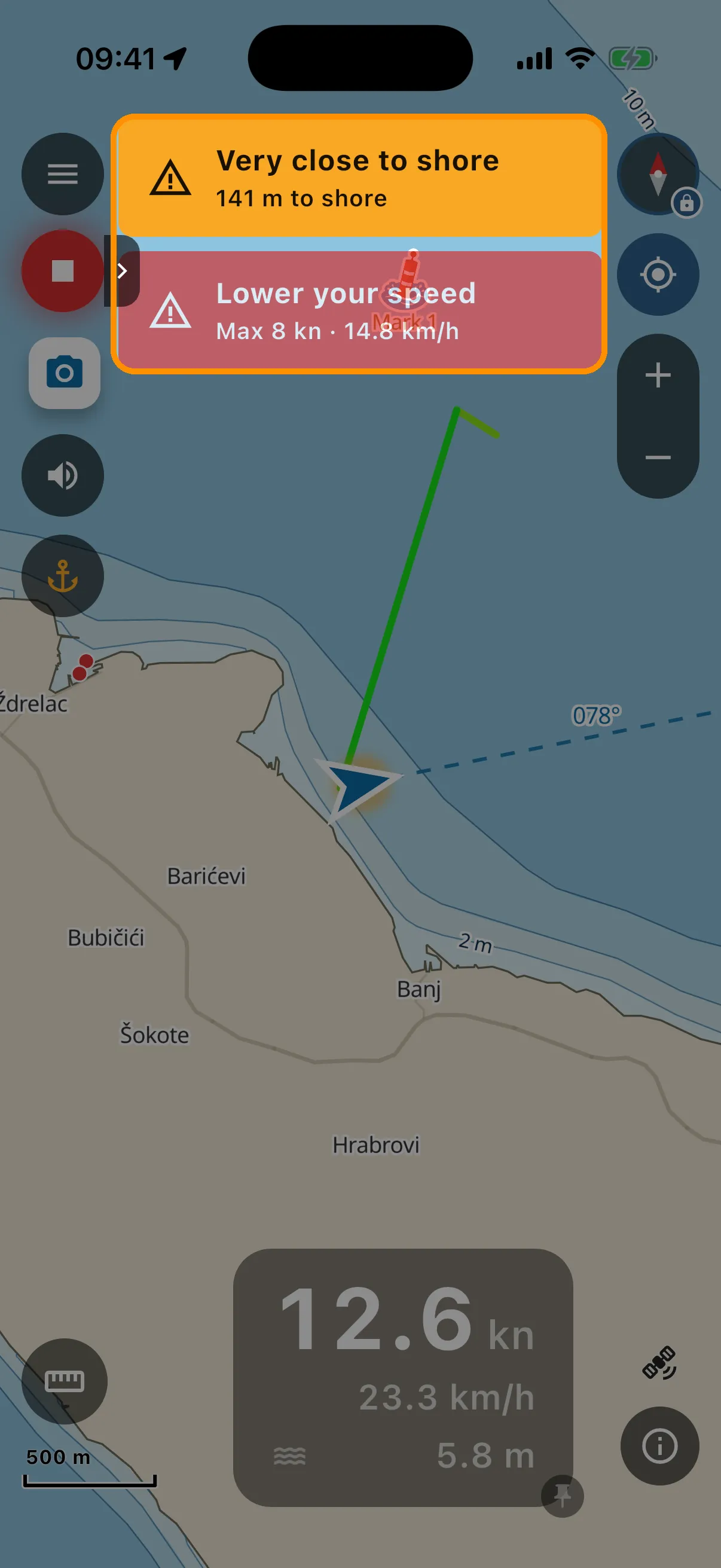
Blue Dolphin watches three things while you drive. All of it is evaluated on the phone and works offline:
- Shallow water ahead (red, sound + vibration). The app looks 30 seconds ahead along your course and compares charted depth with your draft plus your safety margin (both from Your boat). If the water ahead is too shallow, a red banner flashes and the alarm sounds. No boat profile, no depth alarm: the app never guesses your draft.
- Coastal speed (amber, then red). Inside the 300 m zone the app shows a calm amber advisory: “Near shore, max 8 kn”. If you exceed the limit, it escalates to a flashing red alarm, “Lower your speed, max 8 kn”, with sound and vibration, until you slow down or leave the zone.
- Very close to shore (amber). Within about 150 m of the coast while moving, even drifting slowly, an amber banner shows the live distance to shore (very close in it says ”< 50 m”: the chart data cannot tell 10 m from 40 m, so the app does not pretend to), your boat marker starts to pulse, and the chart zooms in a bit so you see the shoreline. A slow drift toward the rocks at anchor-watch speeds is what this catches.
The speaker button on the chart mutes the sound. The banner and vibration always stay. Warnings work only while the app is in the foreground. This is a chartplotter aid, not an anchor alarm you leave running all night.
Driving to the marina with the app open? The app recognises land travel and keeps quiet instead of shouting at your car.